Social publishing
Write a post once and schedule it to 7 networks
Connect X, LinkedIn, Instagram, Threads, Facebook, YouTube and TikTok, then plan posts on a calendar. AI can draft and edit them, and you can also post from the API or an AI agent. It runs on the same account as your email and push.

 X
X LinkedIn
 Threads
 Instagram
 Facebook
 YouTube
 TikTok
POST /v1/social/schedule { "channels": ["<x channel id>", "<linkedin channel id>", "<threads channel id>"], "content": "Kora Coffee now delivers to Abuja.", "scheduledFor": "2026-10-13T09:00:00Z" } // → 202 { "id": "…", "status": "scheduled", ... }
Plan posts in the dashboard, or send them from your own code
- Seven networks, several accounts each
- X, LinkedIn, Instagram, Threads and Facebook for posts, plus YouTube and TikTok for clips made in the Video studio. Connect as many accounts per network as you manage, for one brand or several.
- Composer and calendar
- Write once and publish to every network you select. Images attach natively, each network gets a live preview, and you're warned before a post goes over a character limit. The calendar shows a week or a month; click a day to write a post, or drag one to reschedule it.
- AI drafting
- Draft a post from a one-line brief in the tone you pick, then use the Improve buttons to shorten it, make it punchier, fix the grammar, or add hashtags or emojis. The AI Planner drafts a week of posts at once.
- Auto-reply on X
- When someone mentions your X account, the AI answers from your brand's facts, or passes the mention to you by email when a person is needed. Each person gets at most one automatic reply an hour. You can use a fixed reply instead.
- Publishing and results
- Each post records a status for each network. A failed post keeps the network's error, and editing it puts it back in the queue. A channel that needs reconnecting is marked in the dashboard. Publishing results are shown per post and per channel, and posts on X also show likes, reposts, replies and impressions.
- API, product events and AI agents
- Post from your backend with POST /v1/social/schedule, or have a clip from the Video studio post itself to the channels you picked when it finishes. Claude and other MCP clients can schedule posts through api.startupaid.org/mcp.
Top Fans: your social links and rewards page
The same connected accounts power a public page, on your own domain if you like. Your follow buttons sit at the top, and the people who comment on and reply to your posts are ranked below, network by network. Set prizes by points and restart the ranking weekly or monthly. AI-credit prizes can be paid automatically, up to a daily limit you set, once a fan proves the handle is theirs by posting a short code from it. Other claims wait for you to approve them.
Fan of the week is a short video in your own face and voice that thanks your top fans by name, with a caption for each channel. Nothing is made or posted until you've read the script.
More about Top Fans →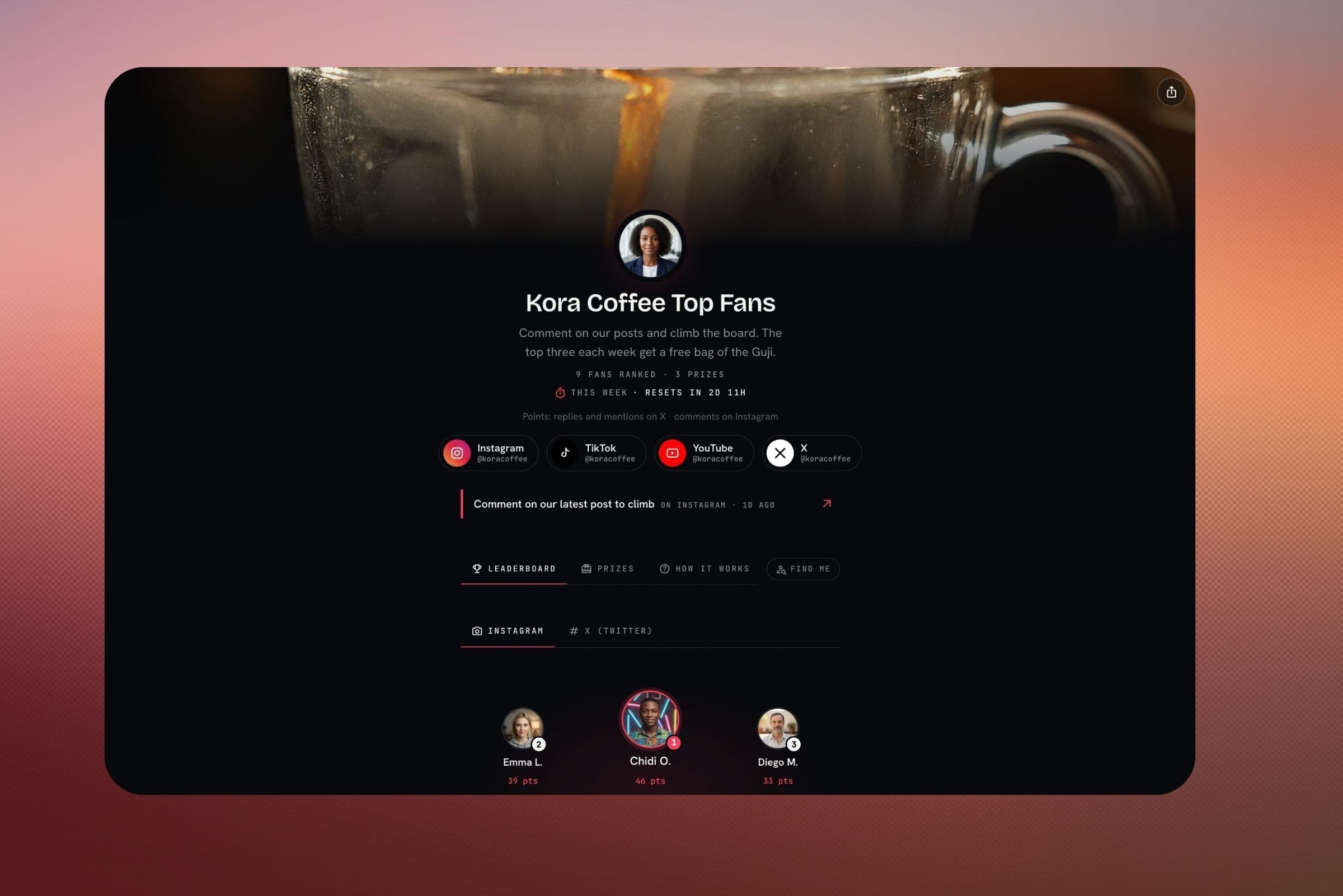
Social FAQ
X (Twitter), LinkedIn, Instagram, Threads and Facebook for posts, plus YouTube and TikTok for clips you make in the Video studio. You can connect several accounts per network, and they all appear in the same composer and calendar.
Yes. Write with AI drafts a post from a one-line brief in the tone you choose, and the Improve buttons rewrite what you have: shorter, punchier, with emojis or hashtags. The AI Planner drafts a whole week at once, and auto-reply can answer mentions on X from your brand's facts, passing them to you by email when a person is needed.
As you write, you see a preview for each network. Images attach natively on all of them, and the composer warns you before a post goes over a network's character limit. AI drafts are written for the networks you've selected. Editing the copy separately for each network isn't available yet; it's on our roadmap.
Yes. Call the API from your backend, have a finished video clip post itself, or connect an MCP client such as Claude through the remote connector at api.startupaid.org/mcp or the @startupaid/mcp package. It runs on the same account as email, push and currency.
Each post records a status for each network. A failed post keeps the network's error, and editing it puts it back in the queue. A channel that needs reconnecting is marked in the dashboard.
Social is its own product on your account, with the same API key and dashboard as email, push and currency. It has a free tier, and the pricing page lists the paid plans.
The other products on the same account
They share one API key, one dashboard and one event stream, so adding one later doesn't mean another vendor or another integration.
- AI ReceptionistAnswers your phone and your website chat from your own facts, and puts customers through to you when they need a person.
- Email & AutomationTransactional and marketing email from your own domain, with automations and delivery tracking. 5,000 emails a month are free.
- Push MessagingiOS, Android and web push from one send call, using your own keys. Free, with no volume cap.
- Currency ConversionRates for 230+ currencies across fiat, crypto and metals, with your own spread and the rate's timestamp on each conversion.
- AI VideoTalking videos, re-voiced screen recordings, narrated decks, short films and single clips, made with StartVid, our own presenter model, or Veo, Seedance and Kling.
- Deep LinksFree links that open your app on the right screen, fall back to the web when it isn't installed, and count clicks and opens.
Connect your accounts and schedule your first post for free.
Social runs on the same account and API key as your email and push.
No credit card · free tier included